
Vindroid SMS Viewdget (Widget)1.5.1 - Get APK
You'll be able to download in few seconds.
Publisher Description
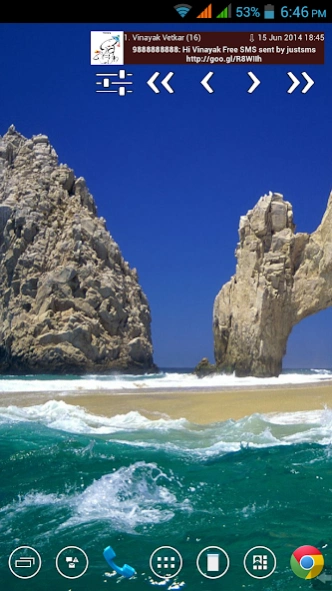
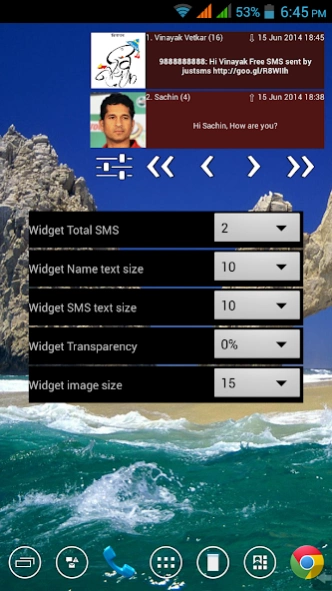

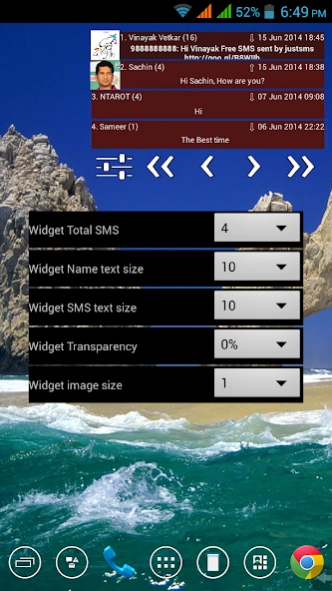
SMS Widget Simple and easier way to view SMS by unique Thread system
This is home screen sms widget to view sms in categorized way.
Note that this is only widget and won't be available in app list.
To add Widget on your home screen long press on home screen, press the Widget option and choose Vindroid SMS Viewdget.
This app doesn't use android's built-in thread system.
All sms threads are redefined to view and doesn't actually change the original sms.
SMS received from similar custom sender (like bank transaction, trading, etc.) are clubbed together.
For example, sms from ABCD bank are received from AM-ABCDBK, TD-ABCDBK, DM-ABCDBK, ...
Android's built-in thread system shows them in different threads.
This app widget clubs all these sms in one thread. This works similar for other custom senders.
View sms received via free sms services like way2sms (AM-WAYSMS, TD-WAYSMS ...), justsms (DT-JstSMS, DM-JstSMS, ...) as if received from person.
These sms are received via similar custom sender with sender's number in message body.
This app widget recognizes such sms and categories them in respective sender's thread.
If you want other similar services to be included, please e-mail me with the details.
In the widget you can set 1 to 5 messages to display.
widget will show first (latest) sms of each thread with sender, time, sms and contact image (if available).
Click on sms to view all sms in that thread in pop-up style.
Easy reply option in Viewer (Not available in KitKat).
Note that for dual sim mobile, it sends sms from default sim selected. If no default sim selected, sms sent from sim 1.
Click to delete in Viewer (Not available in KitKat).
Widget Text and image size can be fine tuned from settings.
Display 1 to 5 SMS per page in widget.
Buttons to go to first, previous, next or last thread.
This is first version. More features to come. Stay tuned.
Provide your feedback / suggestions.
Version 1.1
Now can speak (read aloud) SMS (Android 4.0.3 and later).
Google Text-to-speech engine support added to read SMS in default launguage.
To set default Text-to-speech launguage, go to Setting, Text to Speech Output.
Tag : sms widget
About Vindroid SMS Viewdget (Widget)
The company that develops Vindroid SMS Viewdget (Widget) is Vinayak Vetkar. The latest version released by its developer is 1.5.1.
To install Vindroid SMS Viewdget (Widget) on your Android device, just click the green Continue To App button above to start the installation process. The app is listed on our website since 2015-10-15 and was downloaded 0 times. We have already checked if the download link is safe, however for your own protection we recommend that you scan the downloaded app with your antivirus. Your antivirus may detect the Vindroid SMS Viewdget (Widget) as malware as malware if the download link to com.vindroid.widget is broken.
How to install Vindroid SMS Viewdget (Widget) on your Android device:
- Click on the Continue To App button on our website. This will redirect you to Google Play.
- Once the Vindroid SMS Viewdget (Widget) is shown in the Google Play listing of your Android device, you can start its download and installation. Tap on the Install button located below the search bar and to the right of the app icon.
- A pop-up window with the permissions required by Vindroid SMS Viewdget (Widget) will be shown. Click on Accept to continue the process.
- Vindroid SMS Viewdget (Widget) will be downloaded onto your device, displaying a progress. Once the download completes, the installation will start and you'll get a notification after the installation is finished.
Program Details
System requirements
Download information
Pricing
Version History
version 1.5.1
posted on 2015-10-16
Version 1.5.1
Lollipop Bug fixed
Can delete SMS in Lollipop
Version 1.5
Light and Dark themes added.
If Dark or Red theme selected font color is white.
If Light theme is selected font color is black.
Version 1.4.1
Bug fixed
Version 1.4
When clicked on read aloud (Text to Speech), shows Volume Panel to adjust volume.
Version 1.3
In sms view, Shortcut button added to read aloud (Text to Speech).
Version 1.2
SMS view added with clickable links.
Disclaimer
External Download
We do not host Vindroid SMS Viewdget (Widget) on our servers. We did not scan it for viruses, adware, spyware or other type of malware. This app is hosted by Galad and passed their terms and conditions to be listed there. We recommend caution when installing it.
The APK Download link for Vindroid SMS Viewdget (Widget) is provided to you by apps112.com without any warranties, representations or guarantees of any kind, so access it at your own risk.
If you have questions regarding this particular app contact the publisher directly. For questions about the functionalities of apps112.com contact us.
